
Group-buy split bills are here: open a menu, and who ordered what adds up for you
Paji Splitly group-buy mode is built for organizers running a group order: open one shared menu, let people pick their own quantities, and orders roll up into one ready-to-place list — plus a free-shipping progress bar and everyone paying you directly.
Running a group order? The tallying always lands on you
Someone at the office starts a cake order, the neighborhood chat rallies for a fruit buy, friends pool a restock — group buys always kick off with a buzz. The one who runs it does the real work.
Everyone chimes in the chat: "+1, two matcha," "one pack of cookies for me," "add one for me too." The messages keep scrolling, and when it's time to place the order, the organizer scrolls back through the whole thread, counting one by one: how many matcha total, how many cookie packs, how much each person owes, whether you've hit free shipping.
After all that scrolling, you usually open a spreadsheet and type in names, items, quantities, amounts, cell by cell. Miscount one, misread a row, and you either eat the difference or go back and ask everyone again.
Paji Splitly's new group-buy mode is built to take this over. You open a menu, everyone picks from the same one, and who ordered what, how many, how much — it all adds up for you. You just place the order.
Open a menu, and everyone picks from the same one
When you create a bill, choose group-buy mode, and you're the organizer. Then list what you're ordering as a menu — item name and unit price, like "Matcha cake $250" and "Cookies $120." The menu is shared, so everyone joining sees the same one.
People don't type in quantities — they just tap - / + on the menu: two matcha means tap up to 2, one pack of cookies means tap to 1. Each person picks their own, and what they pick becomes their order.
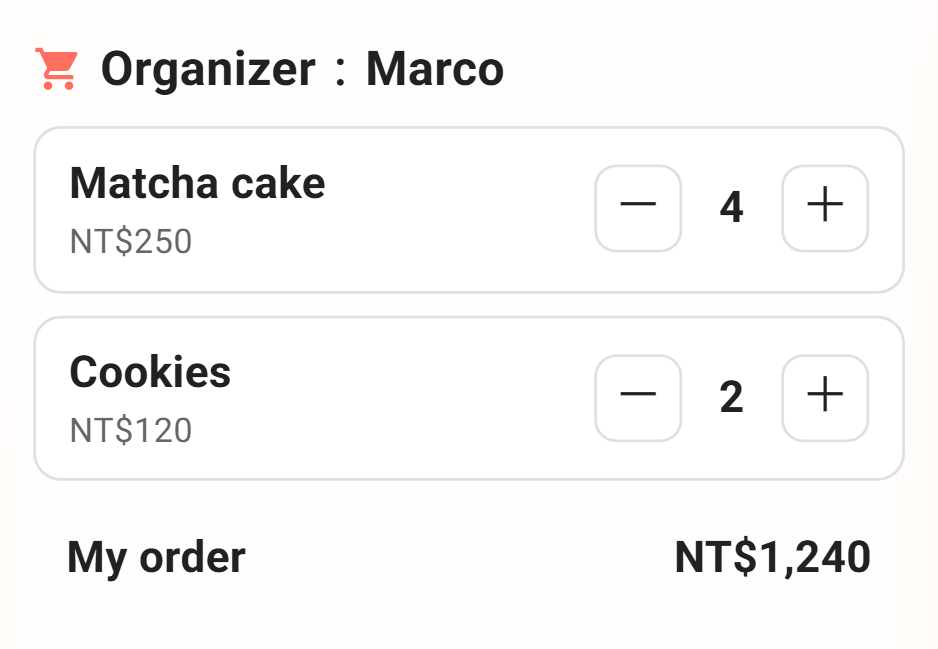
Compared to a chat thread, there's a lot less room to misread a row — what each person picked is recorded right on the menu, not buried as the thread scrolls on.
What to order, tallied into one list
What the organizer really wants to know is one thing: how many of each to order.
So instead of a long ledger, you open to an order list rolled up by item — Matcha cake ×8, Cookies ×5, each subtotal added up for you. Take that list and place the order directly; no more counting yourself.
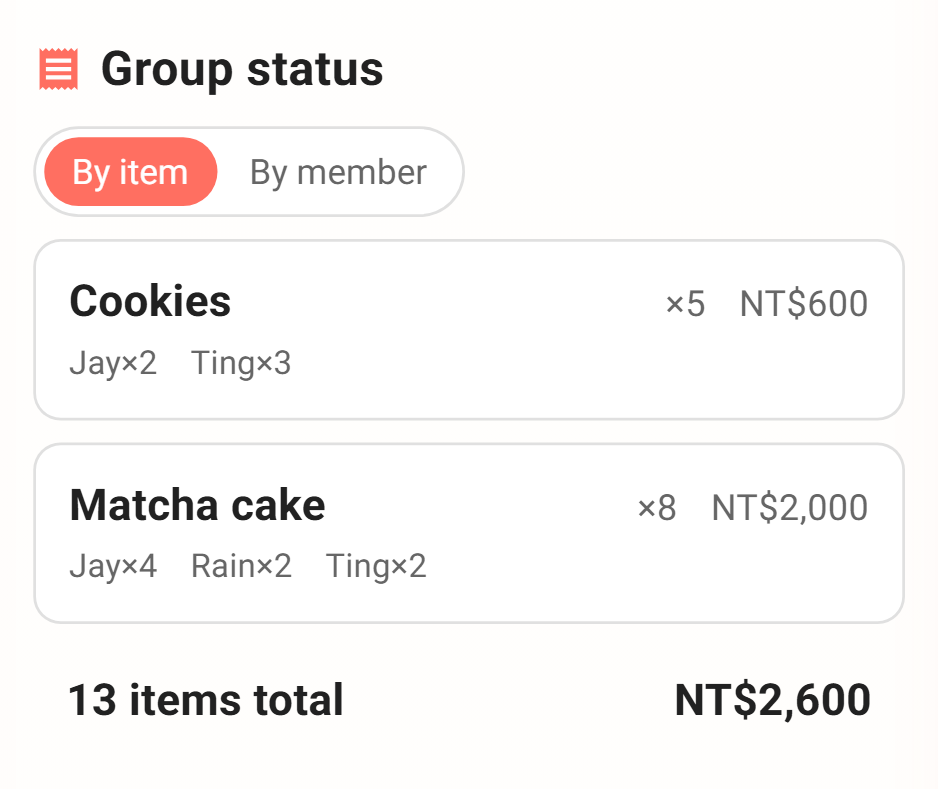
And under each item it lists who ordered it and how many — exactly who, exactly how many, clear as day. Need to check with someone? No flipping back to the chat.
Chasing free shipping, everyone watches the bar together
The classic last stretch of a group buy: "so close to free shipping."
You can set a free-shipping goal, and a progress bar shows up — how much the group has raised so far, how far off free shipping is, all at a glance.
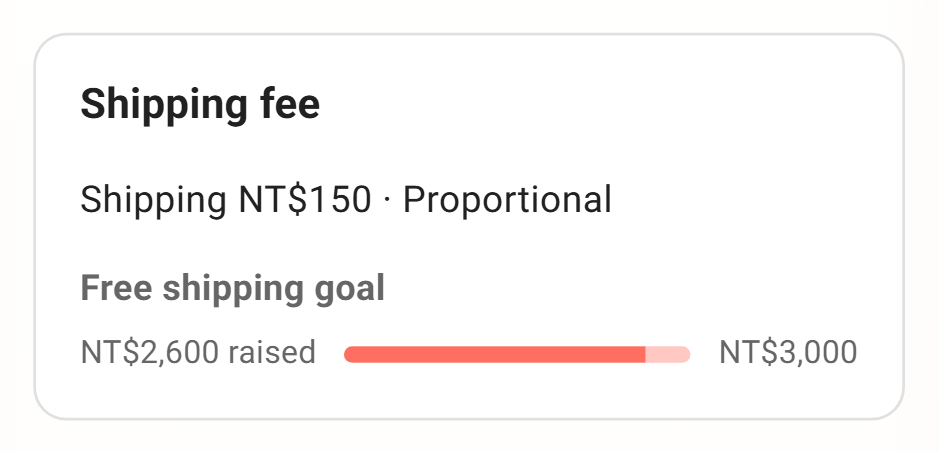
And the bar is public — everyone joining can see where the group's at. When you're just short, you often don't even have to ask; someone adds one more to top it off. A group buy is public coordination by nature, so everyone watching the same bar is the whole point.
Shipping's unknown until the end — that won't hold things up
While people are still joining, shipping usually isn't settled — how much to hit free shipping, whether it's overweight — you often only know once the group closes and you actually place the order.
So shipping can sit as "pending" for now, without holding anyone back from joining. Once you've placed the order and shipping is known, fill it in and it splits across everyone automatically, updating each person's total. No single undecided number stalls the whole group.
Everyone pays you; see who's paid at a glance
The money in a group buy is simple: everyone pays the organizer, no one owes each other.
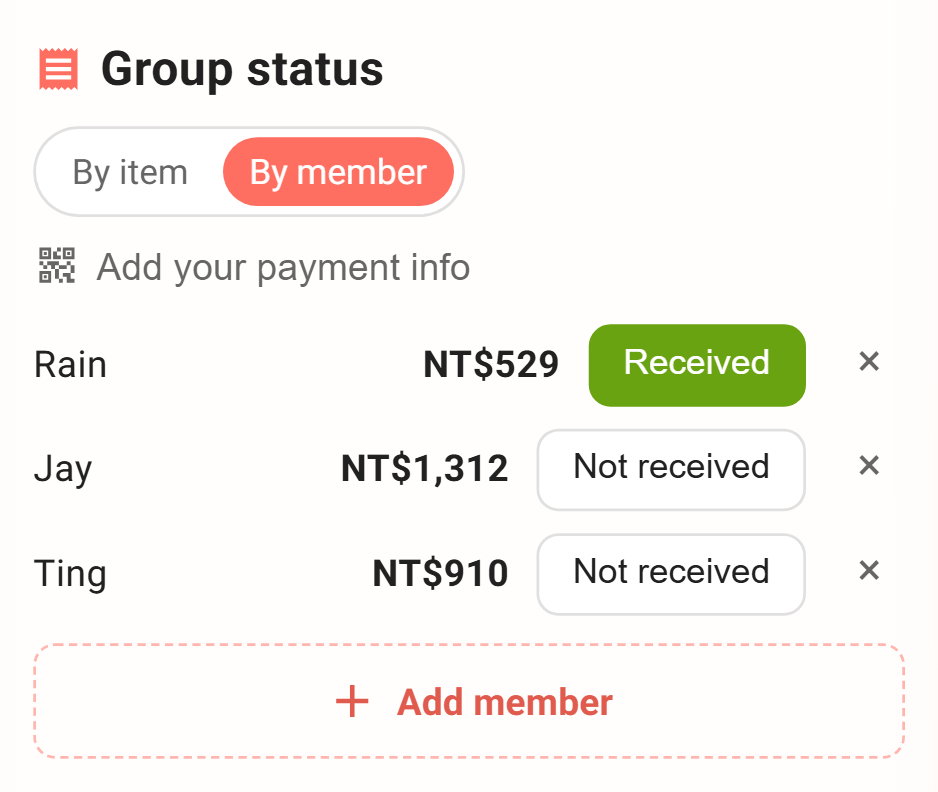
So on the collection side, you get a per-person list — how much each joiner owes you, paid or not. Mark one off as it comes in; who's left, whether you've collected it all, one glance. No roll call in the group chat. Marking "paid" is something only you (the organizer) can do — the money lands with you, so you confirm it.
Want a share yourself? Of course
Whoever runs the group often wants in too — this batch of matcha cake, you'd like one as well.
The organizer can order from the menu for yourself just the same, pick a quantity and it's recorded. Your own share cancels itself out and doesn't inflate the "how much to collect from everyone" total — what's owed still counts only the others.
Who this update helps
- The person who always runs group buys at the office, the neighborhood, or a parents' chat, tallying quantities and amounts for a crowd.
- Group orders for cake, desserts, drinks, or lunch — where people want different items and different quantities.
- Buys that need to hit free shipping or a minimum to ship, where you want everyone watching the bar and chipping in.
- Anyone who's been doing the chat-thread-then-spreadsheet tally every single time.
The goal of group-buy mode is simple: keep the person running the buy from having to be a human spreadsheet. Open the menu, let people join, and the tallying, the free-shipping goal, and the collecting — leave those to Paji Splitly.