
Service charges, tips, and card fees: splitting them clearly with Paji Splitly surcharges
A complete guide to Paji Splitly surcharges: fixed amounts, percentages, proportional, even, and selected-member splits, plus when to use bill-level vs trip-stop scope.
That last 10% on the bill — who actually pays it?
Four friends finish dinner. The bill arrives, and tucked under the total is one more line: 10% service charge.
Marco had the steak. Bob just had a drink. Split that 10% evenly, and the person who barely ordered ends up subsidizing everyone else.
That is usually when someone shrugs and says, "It's fine, I'll cover it."
But that extra cost can be spelled out clearly. That is exactly what surcharges in Paji Splitly are for. A service charge, an overseas card fee, a hotel cleaning fee, a seat fee at one stop on a trip — they all share one trait: the money is not a purchase of its own. It sits on top of the spending, someone fronts it, and it should be shared across some group.
A surcharge gives that money its own place. You do not have to bury a service charge inside a food item, or write "add 10% at the end" in a note. It shows up as its own line on the bill and flows straight into the final settlement.
Where to add it, and what the dialog looks like
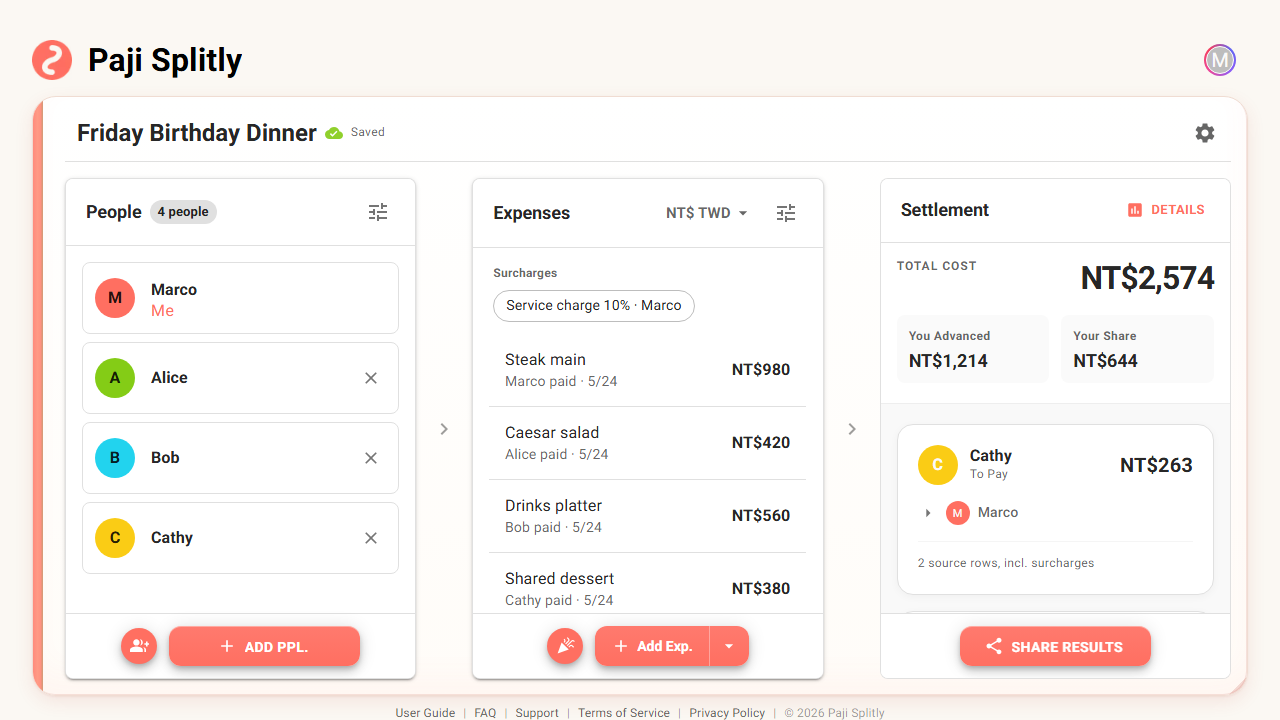
On a regular bill, open the dropdown next to "Add expense" and choose "Add surcharge." Travel mode adds two more entry points: a "Trip-level surcharges" section for the whole trip, and a "Surcharges" section inside each trip stop. More on the difference below.
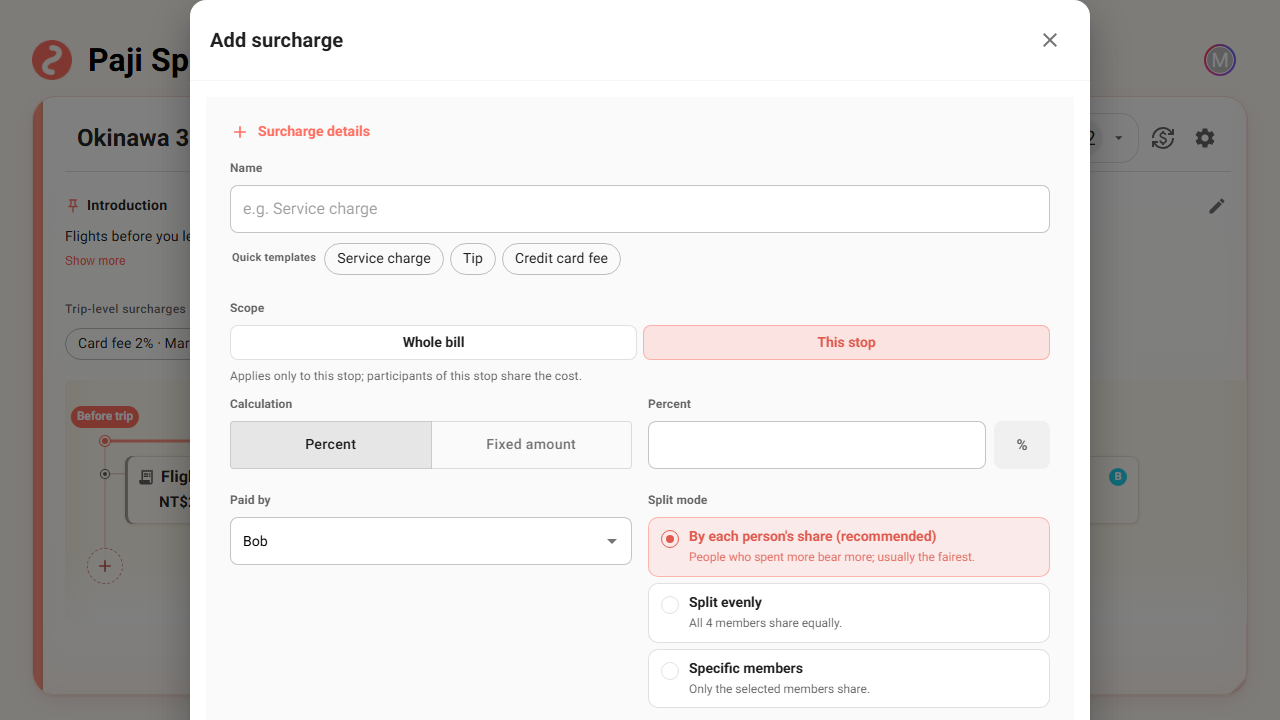
The dialog keeps the decisions in one place: name, calculation (percentage or fixed amount), who fronted it, and how to split it. Above the name field there is a "Quick templates" row — Service charge, Tip, Credit card fee — one tap fills the name for you. When you open it from a trip stop, there is also a "Whole bill / This stop" scope selector at the top.
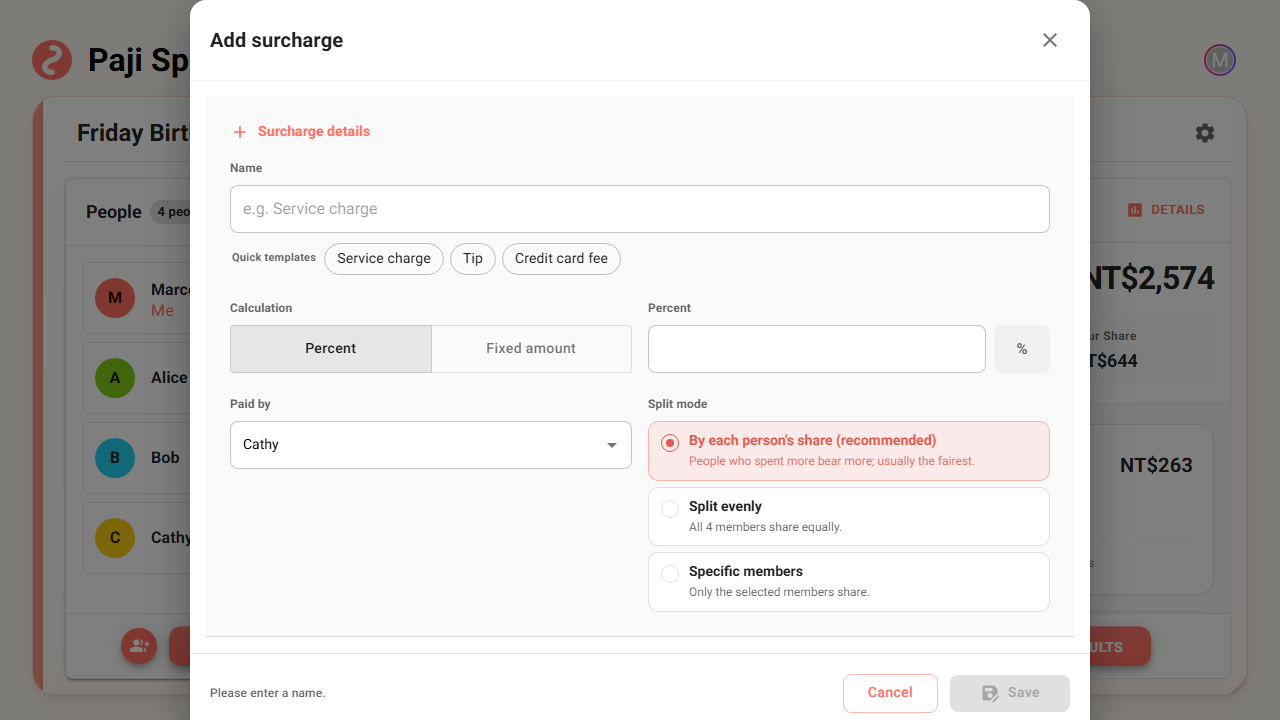
Before you type an amount, it helps to settle four things first: the scope this money is split across, whether it is a percentage or a fixed amount, who paid it first, and how it should be divided. The three situations below cover the split methods.
Restaurant service charge: split by what each person spent
The most common case is a restaurant service charge.
Four people eat out. Marco gets the steak, Alice the Caesar salad, Bob a drinks platter, Cathy a shared dessert — everyone spends a different amount, and the restaurant adds a 10% service charge on top.
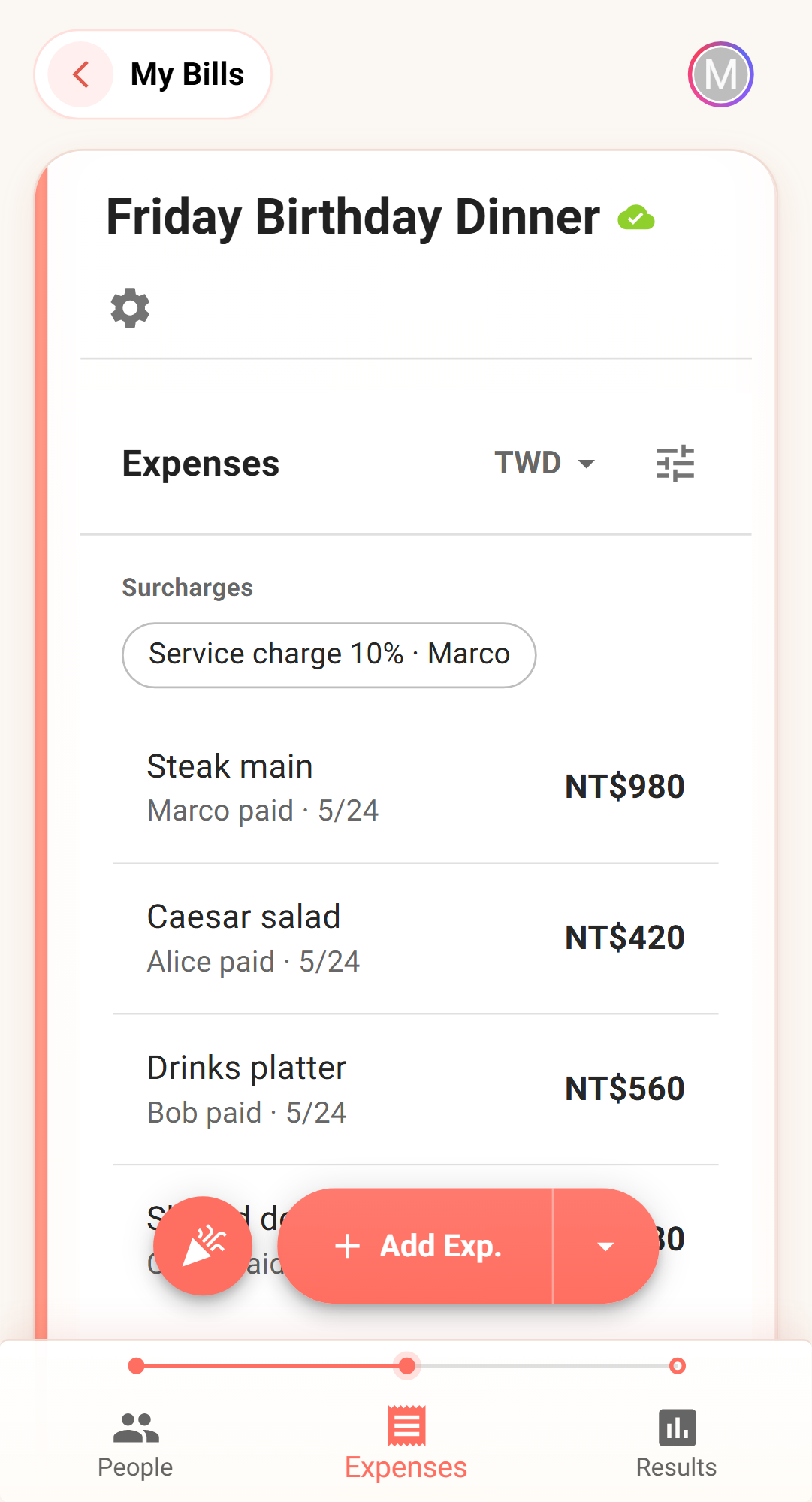
Here is the setup that fits:
- Name: Service charge
- Calculation: Percent, value 10%
- Payer: whoever actually paid by card or cash
- Split: By each person's share
- Scope: the whole bill
"By each person's share" is built for exactly this. A service charge scales with the original spending, so whoever ate more carries more of it, and Bob — who only had a drink — does not get charged like he ordered the steak.
If everyone happened to spend the same (a fixed-price set menu, say), you can switch to splitting evenly. But the moment people's orders differ, percentage plus a proportional split is usually closest to what the receipt actually means.
Tips and cleaning fees: a fixed amount, split evenly
Some surcharges are not percentages — the amount is fixed from the start. For example:
- The group decides to add a $300 tip for the staff.
- The venue charges a $500 cleaning fee.
- A flat room fee on top of the minimum spend.
- Parking or a luggage locker — not anyone's main purchase, but everyone uses it.
For these, pick "Fixed amount."
If everyone benefits, splitting evenly is the simplest. A $300 tip across four people is $75 each — nobody can get that wrong. For a fixed amount where everyone benefits about the same, even is the easiest to read.
But if only some people should cover that fixed cost, do not split it evenly. That is the next case.
Not everyone joined? Use a specific-members split
The thing people argue about with surcharges is rarely the amount — it is who should be in on it.
These situations call for a "Specific members" split:
- The service charge on the drinks only goes to the people who drank.
- Only two people added dessert, so its service charge should not land on the whole table.
- On a trip, only a few people joined a paid activity, so that card fee only concerns them.
- Someone left right after dinner, so a tip added later should not be charged to them.
Switch the split method to "Specific members," then tap the people who should share it. This is not making the bill more complicated — it is writing down an agreement the group already had.
A quick test: if someone in the group would look at this charge and say "I wasn't part of that," do not split it evenly.
Travel mode: the whole trip, or just one stop?
Travel mode is a little different, because people are not together every day or every meal. So a surcharge has to decide first: does it belong to the whole trip, or just one stop?
A cost that affects the whole trip goes on the bill level. In travel mode, that level represents the entire trip — for example:
- The 1.5% overseas fee that shows up on the card statement after booking a hotel.
- A service fee a booking platform charges on the whole order.
- Extra costs on a shared rental car, insurance, or deposit used across the trip.
Do not jam these into a single day. Put them at the trip level, and settlement handles them across the whole trip. If a fixed-amount surcharge is in another currency, you can record it in a currency the bill already uses — settlement converts it back to the bill's settlement currency, so payment directions stay consistent.
A cost that belongs to one activity goes on the trip-stop level. Say the trip has four people, but only three go to the "Seaside Dinner," where the restaurant charges a seat fee, or that meal has a service charge. Put it on the whole trip and the people who skipped it get charged too. Hang it under the "Seaside Dinner" stop instead.
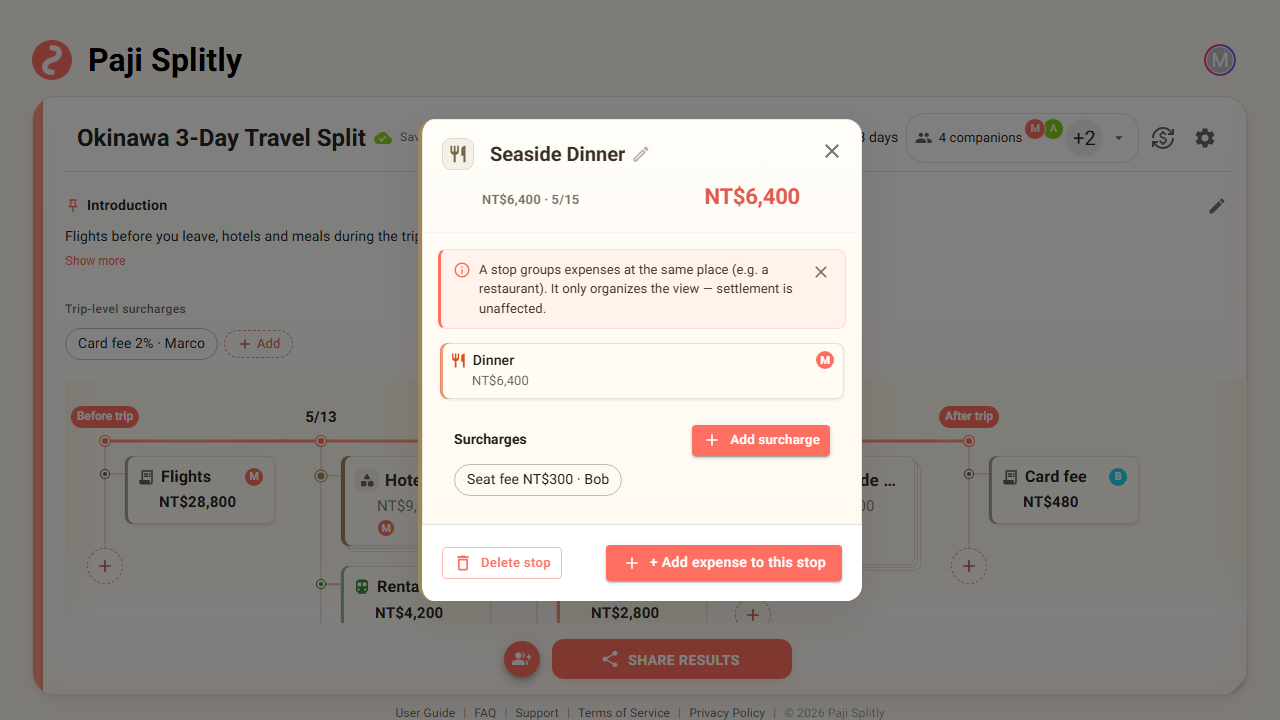
When you add a surcharge from a trip stop, the scope defaults to "This stop" — it only counts with that stop's spending and does not spread across the whole trip.
The test is simple: if that cost would not exist without the stop, it belongs to the stop, not the whole trip.
The three-second check: where, how, who
If you just want it fast, remember three steps:
- Where: a whole receipt or a whole trip → bill level; one meal, one attraction, one activity → trip-stop level.
- How: the receipt says 10% or 1.5% → Percent; it says $300 or ¥1,000 → Fixed amount.
- Who: people spent different amounts and the fee tracks the spending → By each person's share; everyone benefits about the same → Split evenly; only some joined → Specific members.
Those three steps settle most cases.
When not to use a surcharge
A surcharge is not a replacement for a regular expense.
If someone bought a clear thing — lodging, a train ticket, an entrance ticket, the main dinner tab — add a normal expense. A surcharge is for the extra cost that sits on top of spending.
Put simply: main spending goes in as an expense; the extra shared cost added on top goes in as a surcharge.
One more thing to remember: CSV export does not include surcharges right now. If you plan to export to a spreadsheet and tidy things up there, double-check which surcharges the bill has so you do not miss them.
Before you settle, take ten seconds to check
Surcharges flow into the settlement: the payer is treated as having fronted the amount, and everyone sharing it gets their portion added to what they owe.
Before you hit share or settle, scan these:
- Is this charge on the right scope?
- Did you mix up percentage and fixed amount?
- Is the payer the person who actually paid?
- Does the split match what the group agreed on?
- For a selected-members split, did you miss anyone or tick one too many?
Surcharges are usually small, but they are the easiest thing to turn into "someone quietly overpaid and doesn't know why." Spell them out and the bill stays clean — so that "It's fine, I'll cover it" at the end of dinner does not have to happen again.